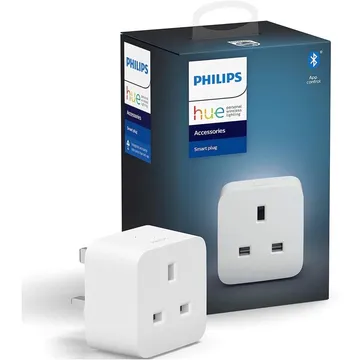
Philips Hue Smart Plug, UK Type G
A Philips Hue plug for lamps on Zigbee and Bluetooth, for the Hue app, Zigbee2MQTT and Home Assistant (ZHA). A Hue Bridge adds the full feature set.
Works with


Features
Which features work depends on your hub. Apple Home, Home Assistant and others each expose different ones.
About
A compact UK plug that makes any lamp smart, with on and off control and no energy monitoring. It talks Bluetooth to the Philips Hue app for simple setups, and Zigbee to a Hue Bridge, Zigbee2MQTT or ZHA for the full feature set. Philips recommends using it with lamps.
Before you buy
Owners report trouble adding the plug to a Hue Bridge: the QR code listed the wrong devices and serial number entry failed, even after resetting the plug to a flashing amber light and setting it up beside the bridge. Zigbee2MQTT users also report that power_on_behavior was not exposed on firmware 1.104.2, so plugs came back on after a power cut.
Owner reports, Jan 2024 – Aug 2026 · r/Hue: Hue Smart Plug setup · Zigbee2MQTT issue 20786: OTA and power_on_behavior · checked 3 Nov 2026
Critic review
T3 calls it a discreet, quick and consistent way to make lamps smart, and the right pick for anyone who already runs Hue, with voice assistant and HomeKit support. It adds that owners without a Hue Bridge have better, cheaper options, that there is no energy monitoring, and that Bluetooth alone does not give full functionality.
T3 · Yasmine Crossland · 25 May 2021
Pairing
- Plug it in and add it in the Philips Hue app: over Bluetooth, or on a Hue Bridge with Accessory Setup.
- Plug it in and add it in the Philips Hue app: over Bluetooth, or on a Hue Bridge with Accessory Setup.
- Then in Aeotec Smart Home Hub
- Open the SmartThings app, tap +, then Add device.
- Choose Scan nearby to start the search.
- Pick a room and give the device a name.
- Plug it in and add it in the Philips Hue app: over Bluetooth, or on a Hue Bridge with Accessory Setup.
- Plug it in and add it in the Philips Hue app: over Bluetooth, or on a Hue Bridge with Accessory Setup.
- Then in Hubitat
- In Hubitat, open Devices and choose Add device.
- Pick Zigbee, then Start Zigbee pairing.
- Name the device and choose a room once it is found.
- Plug it in and add it in the Philips Hue app: over Bluetooth, or on a Hue Bridge with Accessory Setup.
- Then in Third Reality Smart Hub
- Open the Third Reality app and choose Add device.
- Pick the device type and follow the app’s prompt.
- Give the device a name and choose a room.
- Plug it in and add it in the Philips Hue app: over Bluetooth, or on a Hue Bridge with Accessory Setup.
- Then in Home Assistant
- Go to Settings → Devices & services and open the ZHA integration.
- Choose Add device to start the scan.
- Pick the device when it appears, then assign it to an area.
- Plug it in and add it in the Philips Hue app: over Bluetooth, or on a Hue Bridge with Accessory Setup.
- Then in Zigbee2MQTT
- Open the Zigbee2MQTT frontend and turn on Permit join for the coordinator.
- Wait for the device to appear in the Devices list.
- Rename it and assign it to a room.
- Plug it in and add it in the Philips Hue app: over Bluetooth, or on a Hue Bridge with Accessory Setup.
- Then in deCONZ
- Open Phoscon and go to Devices, then choose the kind of device.
- Start the search and keep the device close to the ConBee or RaspBee.
- Give the device a name when it appears.
- Plug it in and add it in the Philips Hue app: over Bluetooth, or on a Hue Bridge with Accessory Setup.
- Then in Zigbee for Domoticz
- Open the Zigbee for Domoticz interface and allow new devices to join.
- Wait for the device to appear, then give it a name.
About 2 minutes. Put the device into pairing mode first, then add it to your hub.
FAQ
Does the Hue Smart Plug need a Hue Bridge?
No for basic use: it works over Bluetooth from the Philips Hue app. You will not get full functionality over Bluetooth alone, and a Hue Bridge unlocks more features.
Does it work with Apple Home, Alexa and Google Home?
Yes: it works with Amazon Alexa, Google Assistant and Apple HomeKit. Amazon notes that a Hue Bridge is required for some older Echo models, so check yours.
Does it work with Zigbee2MQTT and Home Assistant?
Yes. Zigbee2MQTT lists it as the UK Hue smart plug, and it joins as a Zigbee router. ZHA also supports it.
Can it measure energy use?
No, it has no energy monitoring. If you want readings, look at a plug with monitoring built in.
What can I plug into it?
Philips recommends using it with lamps.