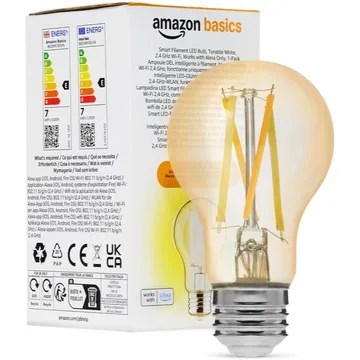
Amazon Basics A60 Smart Filament LED Bulb, Tunable White, E27
A 6.5 W tunable white filament bulb on 2.4 GHz Wi-Fi, set up and controlled through Alexa only. No hub, and no Google Assistant, HomeKit or SmartThings.
Works with


Features
Which features work depends on your hub. Apple Home, Home Assistant and others each expose different ones.
About
A 6.5 W filament-style bulb on an E27 cap that tunes from 2200K warm white to 6500K cool white and dims from 5% to 100%. It joins a 2.4 GHz Wi-Fi network through the Alexa app and works with Alexa only. Dimming is by app or voice only, so a wall dimmer will not control it.
Pairing
- Screw in the bulb, open the Alexa app and wait for the First light bulb found prompt, or add it from the Alexa app under Devices. Reset it from the device settings in the Alexa app.
- Then in Amazon Alexa
- Open the Alexa app, go to Devices, then tap +.
- Choose Add device and pick the brand, or enable its skill.
- Let discovery run, then add the device to a group.
About 2 minutes. Put the device into pairing mode first, then add it to your hub.
FAQ
Does the Amazon Basics smart bulb work with Google Home or Apple Home?
No. The listing says it is compatible with Alexa only, and not with Google Assistant, Apple HomeKit or SmartThings.
Do I need a hub or an Echo?
No hub, and no third-party app or skill. You set the bulb up from the Alexa app on your phone, over 2.4 GHz Wi-Fi.
Can I use it with a dimmer switch?
No. The listing says the bulb dims through the Alexa app or voice control only, so a wall dimmer will not control it.
How do I reset it?
Open the Alexa app, select the bulb under Devices, open its settings with the gear icon and follow the reset steps, then set it up again.