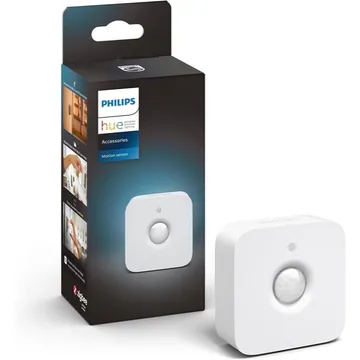
Philips Hue Indoor Motion Sensor
A battery-powered Zigbee indoor motion sensor with a daylight sensor for Hue lights. Works with Zigbee2MQTT, ZHA and deCONZ; Philips says it needs a Hue Bridge.
Works with


Features
Which features work depends on your hub. Apple Home, Home Assistant and others each expose different ones.
About
A battery-powered indoor Zigbee motion sensor with a daylight sensor, running on two AAA cells. It detects motion up to about 5 m and mounts on a wall or ceiling or stands on a surface. Philips says it needs a Hue Bridge setup.
Before you buy
Owners find Hue sensors quick and reliable, but this one detects motion rather than presence, so lights can switch off on someone sitting still. They suggest a longer timeout or a presence sensor. Third-party sensors cannot join a Hue setup, and one owner wants a switch that cancels the sensor's timer.
Owner reports, Aug to Sep 2026 · r/philipshue: How do I make the Hue motion sensor not annoying? · r/Hue: Looking for a Hue compatible Zigbee motion sensor · checked 3 Nov 2026
Pairing
- In the Hue app go to Settings, then Devices, and tap the + button. To reset, hold the setup button for more than 10 seconds, then add it again.
- In the Hue app go to Settings, then Devices, and tap the + button. To reset, hold the setup button for more than 10 seconds, then add it again.
- Then in Aeotec Smart Home Hub
- Open the SmartThings app, tap +, then Add device.
- Choose Scan nearby to start the search.
- Pick a room and give the device a name.
- In the Hue app go to Settings, then Devices, and tap the + button. To reset, hold the setup button for more than 10 seconds, then add it again.
- In the Hue app go to Settings, then Devices, and tap the + button. To reset, hold the setup button for more than 10 seconds, then add it again.
- Then in Hubitat
- In Hubitat, open Devices and choose Add device.
- Pick Zigbee, then Start Zigbee pairing.
- Name the device and choose a room once it is found.
- In the Hue app go to Settings, then Devices, and tap the + button. To reset, hold the setup button for more than 10 seconds, then add it again.
- Then in Third Reality Smart Hub
- Open the Third Reality app and choose Add device.
- Pick the device type and follow the app’s prompt.
- Give the device a name and choose a room.
- In the Hue app go to Settings, then Devices, and tap the + button. To reset, hold the setup button for more than 10 seconds, then add it again.
- Then in Home Assistant
- Go to Settings → Devices & services and open the ZHA integration.
- Choose Add device to start the scan.
- Pick the device when it appears, then assign it to an area.
- In the Hue app go to Settings, then Devices, and tap the + button. To reset, hold the setup button for more than 10 seconds, then add it again.
- Then in Zigbee2MQTT
- Open the Zigbee2MQTT frontend and turn on Permit join for the coordinator.
- Wait for the device to appear in the Devices list.
- Rename it and assign it to a room.
- In the Hue app go to Settings, then Devices, and tap the + button. To reset, hold the setup button for more than 10 seconds, then add it again.
- Then in deCONZ
- Open Phoscon and go to Devices, then choose the kind of device.
- Start the search and keep the device close to the ConBee or RaspBee.
- Give the device a name when it appears.
- In the Hue app go to Settings, then Devices, and tap the + button. To reset, hold the setup button for more than 10 seconds, then add it again.
- Then in Zigbee for Domoticz
- Open the Zigbee for Domoticz interface and allow new devices to join.
- Wait for the device to appear, then give it a name.
About 2 minutes. Put the device into pairing mode first, then add it to your hub.
FAQ
Does the Hue Motion Sensor need a Hue Bridge?
Philips says yes: both the indoor and outdoor sensors need a Hue Bridge-controlled setup as well as the Hue app.
What is the difference between the Hue indoor and outdoor motion sensors?
The indoor sensor is IP20 and uses two AAA batteries. The outdoor sensor is a separate product rated IP54 that uses two AA batteries.
Does the Hue Motion Sensor work with Home Assistant?
Zigbee2MQTT, ZHA and deCONZ all list it. Zigbee2MQTT exposes occupancy, illuminance, temperature, battery, sensitivity, LED indication and the occupancy timeout.
Why does my Hue motion sensor turn the lights off when I am in the room?
It senses motion, not presence, so someone sitting still can time out. In the Hue app you can lengthen the delay after the last motion, and owners suggest a presence sensor for rooms where you sit still.
How do I reset the Hue Motion Sensor?
Open its edit screen in the Hue app and tap Reset. If problems continue, delete it in the app, press the setup button or pinhole for more than 10 seconds, then add it again.